How to Install Tension Fabric Displays
Perfect for trade shows, conferences, events and virtual meeting backdrops, Tension Fabric Displays create a professional look as they promote your brand and products. Once you have your display, follow these step-by-step instructions to learn how to install tension fabric displays.
Before You Begin
Before you begin to assemble your Tension Fabric Display, make sure you have all of the included product parts. Note: Because we offer multiple display sizes, the number of parts will vary based on the size you purchased.
- Top corner poles
- Top horizontal pole
- Vertical shock-corded poles
- Fabric graphic
- Horizontal middle pole
- Base

Tension Fabric Display Setup
Step 1: Lay Out the Display Parts
Remove all of the parts from the carry case and place them on a clean, flat surface.
Step 2: Assemble the Vertical Poles
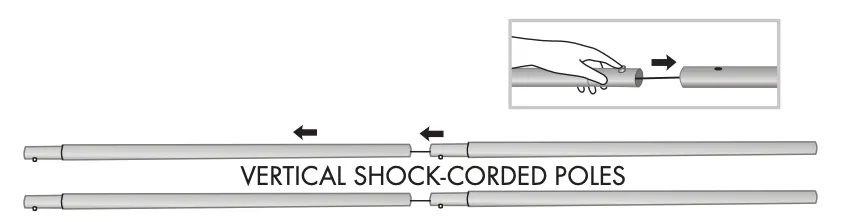
Assemble the vertical shock-corded poles by placing the tapered end of one pole into the large end of the next while pressing the snap button, as shown.
Step 3: Attach the Vertical Poles to the Base
Attach the vertical shock-corded poles into the ports on the base, as shown.

Step 4: Attach the Horizontal Middle Pole
Insert the ends of the horizontal middle pole into both sides of the vertical shock-corded poles, as shown.

Step 5: Attach the Top Poles
Attach the top corner poles and top horizontal pole to the vertical poles, as shown.

Step 6: Install the Fabric Graphic
Slide fabric graphic over the top of the display, as shown.

Display Storage and Care
Place all product parts into the carry case and store them in a cool, dry location. Displays are recommended for indoor use only. Machine wash the fabric graphic on a gentle cycle using mild detergent. Tumble dry with no heat. Do not dry clean or iron.
Replacement graphics are available for Tension Fabric Displays in all sizes.You can find them here: Tension Fabric Display Replacements.
If you have any questions about how to install tension fabric displays or any of our online printing services, check out our Tension Fabric Displays FAQ or please contact customer service.
-

Tension Fabric Displays FAQ
Have a question about printing custom Tension Fabric Displays? Check out these tension fabric displays FAQ and learn about our material, stand, installation and more. What sizes are available? You can design custom Tension Fabric Displays for online printing in four different widths: 2-Foot, 3-Foot, 8-Foot and 10-Foot. What material is available? Our custom displays […]
Read more› -

Fabric Backdrops vs. Vinyl Backdrops
Fabric and vinyl backdrops can both make a big impact at trade shows, events, photo opportunities and other branded environments. The right material depends on where you’ll use your backdrop, how you want it to look and how you plan to transport and install it. As a general rule, choose fabric for a softer, less […]
Read more›